a···a
b···n
g···s
Not following back
Accounts you follow that do not follow you back.
Who unfollowed me on Instagram? MuteView is a free Instagram unfollowers checker that compares the followers and following files from your own data export. No password, and your files never leave your browser.Add one export to see who does not follow you back. Add an older export too, and this unfollow tracker also shows who unfollowed you. Comparing is free.
No password · Runs in your browser · Free
Unfollowed you
Example: 2
Not following back
Example · masked usernames, made-up numbers
Unfollow tracker
Example · masked usernames, made-up numbers
Export 1 (older)
followers_1.json
Unfollowed you
Example: 2
Export 2 (newer)
followers_1.json
Instagram sends no alert. Compare two of your data exports: anyone in the older followers list but missing from the newer one unfollowed you.
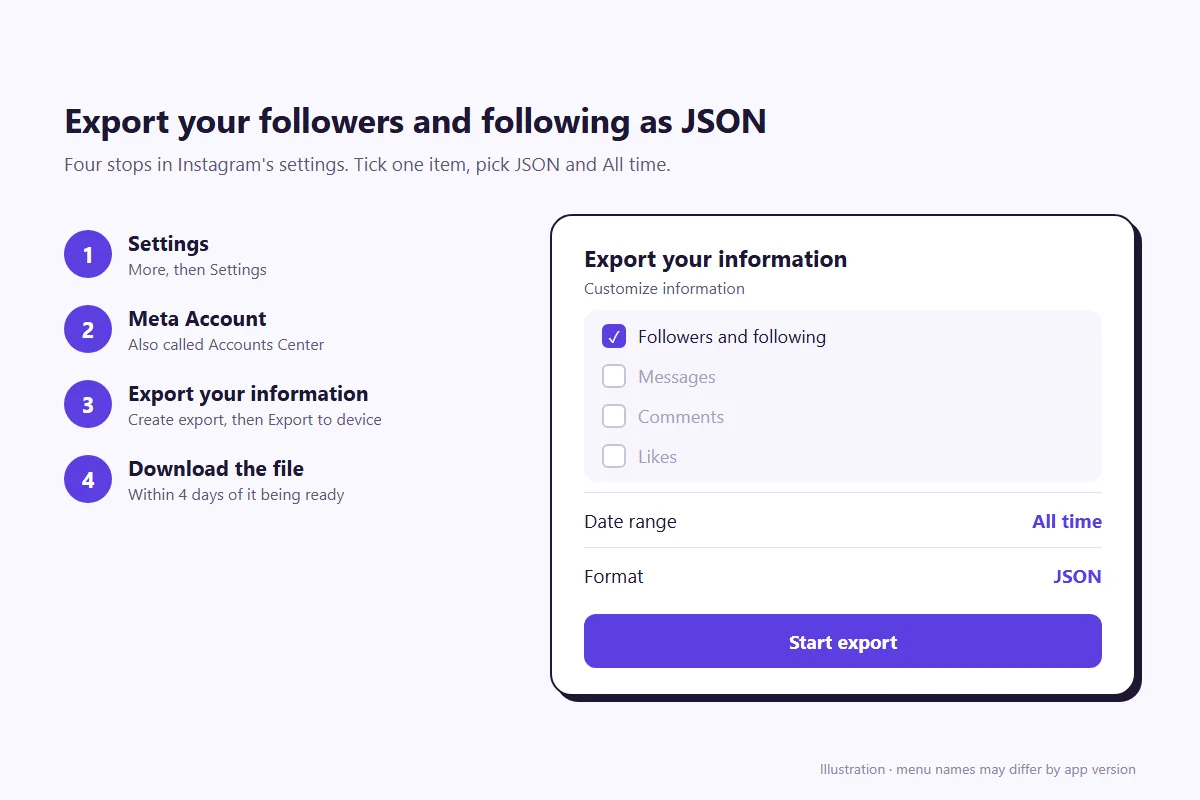
Export your followers and following from Instagram. The steps below show every click.
Drop the .zip file, or the .json files inside it, on this page. Your browser reads them locally.
Read the lists. One export shows who does not follow you back, and two exports from different days also show who unfollowed you.
An export is a snapshot of one day and holds no history of who left. That is why the older export matters: it is the only record of how your followers looked before.
Here is what the results look like before you add a file. Every username below is masked and every number is an example, so none of it is real data.
| List | Example count | Example usernames |
|---|---|---|
| Not following back | Example: 3 | a···a, b···n, g···s |
| Fans | Example: 2 | c···a, m···o |
| Mutuals | Example: 41 | d···v, e···i, f···y |
| Unfollowed you | Example: 2 | b···n, e···i |
| New followers | Example: 1 | f···y |
| Pending follow requests you sent | Example: 1 | h···o |
Your own results show full usernames, and they appear only in your browser. Select Try with sample data to click through a working example before you export anything.
Steps checked on 2026-11-16 against the Instagram Help Center article Review and export a copy of your Instagram information. Instagram is moving people from Accounts Center to Meta Account settings, so your menu may use either name.
In Settings, open Meta Account, choose Export your information, select Followers and following, JSON and All time, then download within 4 days.
Instagram says it can take up to 30 days to email the export link. The download window of 4 days starts when the file is ready.
Choose JSON, not HTML. This page reads JSON files only. If you picked HTML, export again with Format set to JSON.
Most failed checks trace back to one of five choices made during the export. Each one is easy to avoid once you know it.
JSON is a plain-text format built for programs. HTML is a web page built for people. This page reads JSON, so choose JSON when you export.
Inside the ZIP, the files we need are likely in a folder called connections/followers_and_following. It probably holds followers_1.json and following.json. Large profiles may split followers into followers_2.json and more.
We read any .json file whose name contains followers or following, so a different name still works. If your export has a pending follow requests file, we read that too. We ignore everything else in the ZIP, such as media.
Each entry likely holds a username, a profile link and a timestamp. The timestamp marks when the follow happened, not when someone left. The file has no unfollow dates.
The names and layout above come from community reports, so your own export may look slightly different.
One export is enough: accounts in your following list that are missing from your followers list don't follow you back.
Each list answers one question. You can search every list, copy it, or download it as a CSV file.
A name in Unfollowed you is not proof that someone chose to leave. Renaming, deleting, deactivating or blocking an account also removes it from your followers list.
Open profile jumps to the person on Instagram in a new tab. Download CSV saves the list on your device.
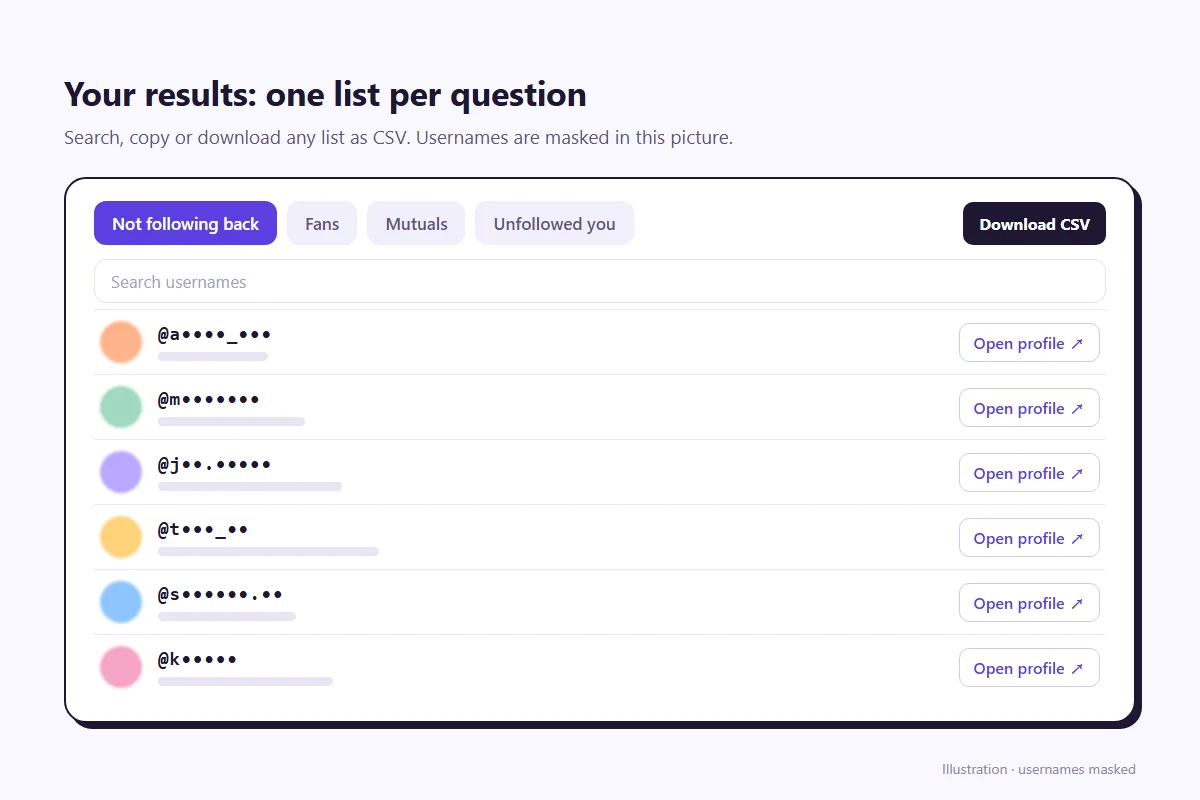
Your profile can show one follower number while this page lists a different one.
The list shows who was in your export file, not who is on your profile this minute. The file is a snapshot, so follows and unfollows after the export are missing.
We count each username once. Followers split across followers_1, followers_2 and more are merged first. Entries with no readable username are skipped, and the results page shows how many.
| What you see | Likely reason |
|---|---|
| Profile number is higher | New followers arrived after the export |
| Profile number is lower | Some people unfollowed after the export |
| The gap is large | Wrong date range or a missing followers file |
A gap of a few names is normal. If the gap is large, check three things on your side first:
The comparison itself is exact: a username is either in a list or it is not. What can mislead you is the data that goes in.
When two exports come from the same profile, both use All time, and both are JSON, the lists match what Instagram put in your files.
Unfollowed you · New followers
Here is the whole comparison with six made-up usernames. The older export lists five followers and the newer one lists four. Anyone in the older list who is missing from the newer one counts as Unfollowed you.
| Username | Older export | Newer export | Result |
|---|---|---|---|
| anna | yes | yes | Still follows you |
| ben | yes | no | Unfollowed you |
| cara | yes | yes | Still follows you |
| dev | yes | yes | Still follows you |
| eli | yes | no | Unfollowed you |
| fay | no | yes | New follower |
In this example, ben and eli unfollowed you, and fay is a new follower. One export works the same way. If following holds anna, ben and gus, and followers holds anna and cara, ben and gus do not follow you back.
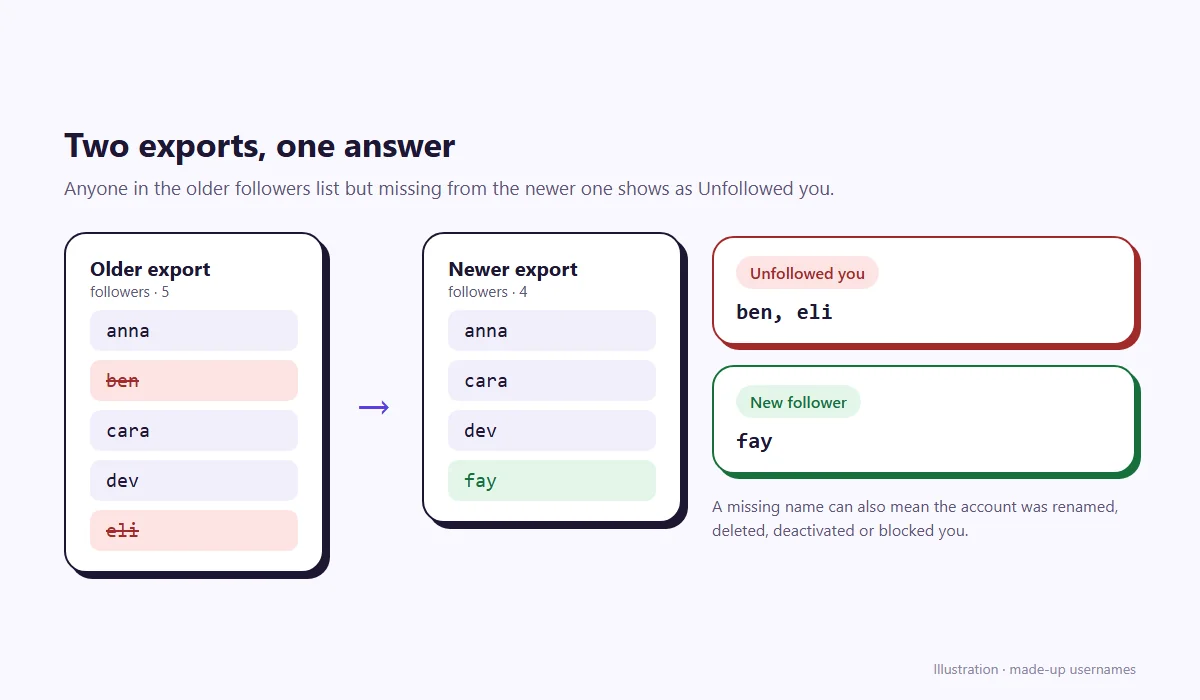
Next time you need an older export to compare against, you do not have to dig for the file. Save the result and this page keeps your lists ready.
We store only the usernames from your followers and following lists. We never store the ZIP or the original files.
Delete saved snapshots removes the copy on this browser. Comparing never requires saving, and it never requires an account.
An export can take a while, and a second export later is the only way to see who unfollowed you. Two small helpers keep you on track, and neither asks for your email.
Instagram gives you 4 days to download a finished export, so open it soon after the reminder.
Every username in your results has two buttons. Open profile opens that person's Instagram page in a new tab, and it costs nothing. View photo opens their profile photo in our Instagram PFP viewer.
View photo counts against your usage allowance, like other lookups on this site. Comparing lists never does.
Clicking View photo sends that one username to the viewer. The rest of your lists stays in your browser.
Whether a photo opens depends on the viewer's own rules for private profiles.
This page reads your files in a background thread of your browser. No server endpoint on this page receives them, so there is nothing to upload to.
How to verify: open your browser's developer tools, switch to the Network tab, then choose a file. No upload request appears. Selecting View photo sends one username to the viewer, and that request is the only one you will see.
An export is a photo of one day. It cannot say when someone left, and it cannot say why.
If your numbers look off, see Why your follower count and the list do not match.
can
cannot
Tools that find unfollowers work in one of four ways. This table compares them by what each asks of you and what it risks. It names no products on purpose.
| Method | Install needed | Uses your Instagram login | Follower limit | Account risk | Works on a phone |
|---|---|---|---|---|---|
| MuteView (open your export in the browser) | No | No, it reads your own export | No cap set by us | No automation on your account | Yes |
| Browser extensions | Yes, in a desktop browser | Yes, your signed-in session | Often capped, commonly around 10,000 | Automated or bulk unfollowing can trigger limits or a locked account | Usually not |
| Apps that ask for your password | Yes, an app | Yes, your password | Varies | Logins from unknown servers can trigger security checks | Yes |
| Username-only lookup sites | No | No | Varies | None to your account | Yes, public profiles only |
Extensions and scripts work inside your logged-in Instagram tab, so every action uses your account. An export needs none of that, which is why this page starts from it.
No. Instagram does not notify you when someone unfollows, and its Help Center describes no built-in unfollower list. The source you can trust is your own data export, which Instagram provides.
Because an export is a snapshot, the routine is simple. Export today, export again later, then compare the two. Each comparison gives you the changes between those two days, and nothing outside them.
Use Send the link to myself so the second export actually happens. You decide how often to repeat it. Each new export becomes the older one for your next comparison, so one export a month builds a chain of snapshots.
Pricing
2 lookups a day signed out; a free account gets 30 a month, up to 5 a day. Pro adds 200 lookups a month; lookup packs never expire.
$5.99/ month
No. This page never asks for your password or login. It only reads the files you export from Instagram yourself.
No. Your browser reads the files, and no upload request is sent. You can check this in the Network tab of your developer tools.
An extension runs inside your logged-in Instagram tab and reads your lists through your own session. Many also offer bulk unfollowing, and automated actions can get your account limited or locked. We use the official export instead, so there is nothing to install and no session to share.
Instagram says it can take up to 30 days to email the link. After that you have 4 days to download the file. Choosing only Followers and following keeps the export small.
Export again and set Format to JSON. This tool reads JSON only, and renaming an HTML file does not work.
Renaming, deleting, deactivating or blocking an account removes it from your followers list. The export cannot tell these cases apart.
No. One export shows who does not follow you back. Two exports from different days show who unfollowed you.
You can choose files on a phone. Start the export itself in the Instagram app or on the website.
Yes. Comparing lists is free and never uses your allowance. Only View photo counts against it.
Yes. Select Remind me in an hour for a browser notification, or Send the link to myself to copy this page's link. We never ask for your email.
Not unless you choose it. Save this snapshot in this browser keeps it on your device.