Free
$0- 2 lookups a day signed out; signed in, 30 a month, up to 5 a day
- Single-post downloads are free
- ZIP up to 20 images
The Instagram story size is a full-screen 9:16 vertical frame, saved here at 1080 × 1920 px.
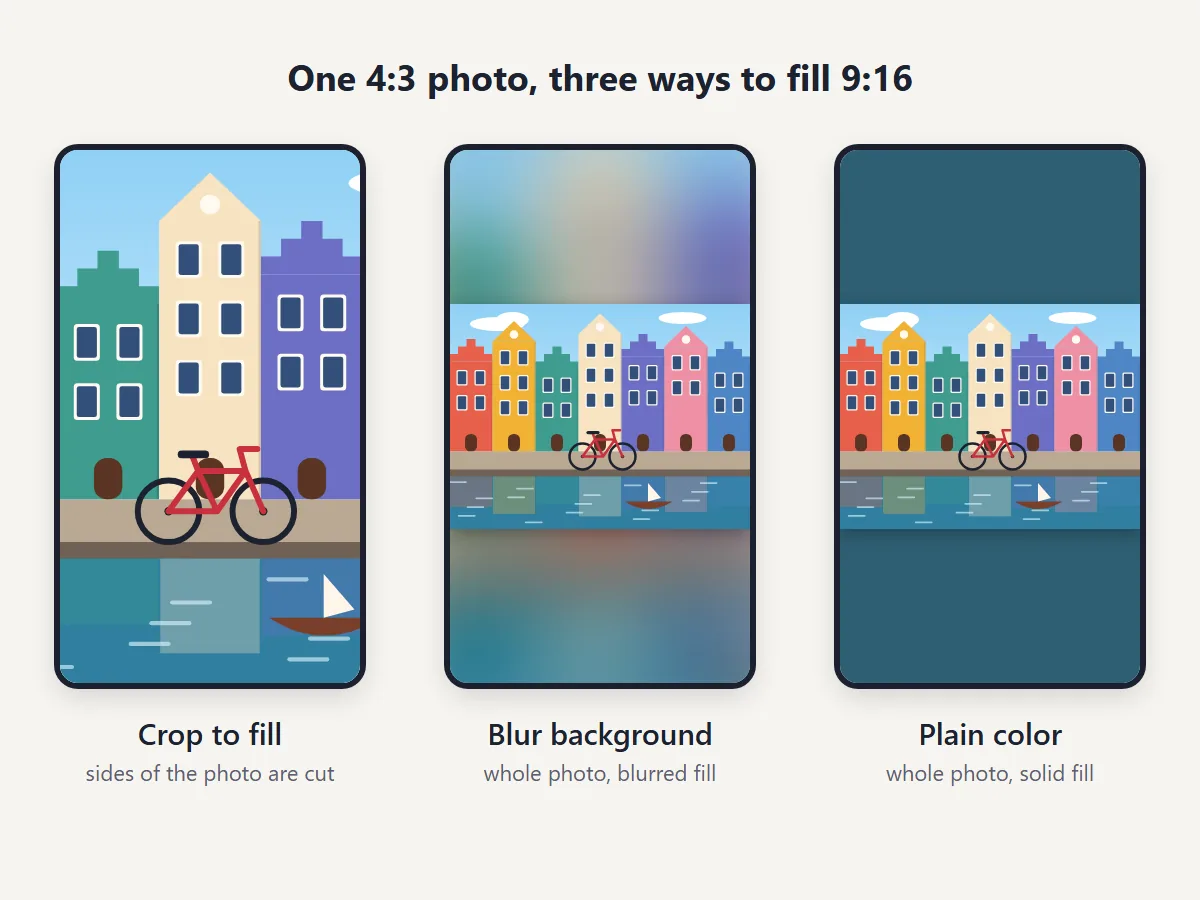
Drop in up to 10 photos and fit each one to 9:16 by cropping, or by adding a blurred or plain background. Then switch between three safe zone guides to see where the buttons will sit.
Stories: 9:16, per Meta developer docs. Story ads: 1440 × 2560 with safe zones of 14% top and 35% bottom, per the Meta Ads Guide. Checked Nov 26, 2026.
JPG, PNG, WebP or HEIC, up to 30 MB each
 9:16 at 1080 × 19203 safe zone guides
Safe zone guide
From Meta's ads guide for story ads. The strictest of the three.
Drop up to 10 photos for your story, or choose files
JPG, PNG, WebP or HEIC, up to 30 MB each
Photo shape
Fill
Save as
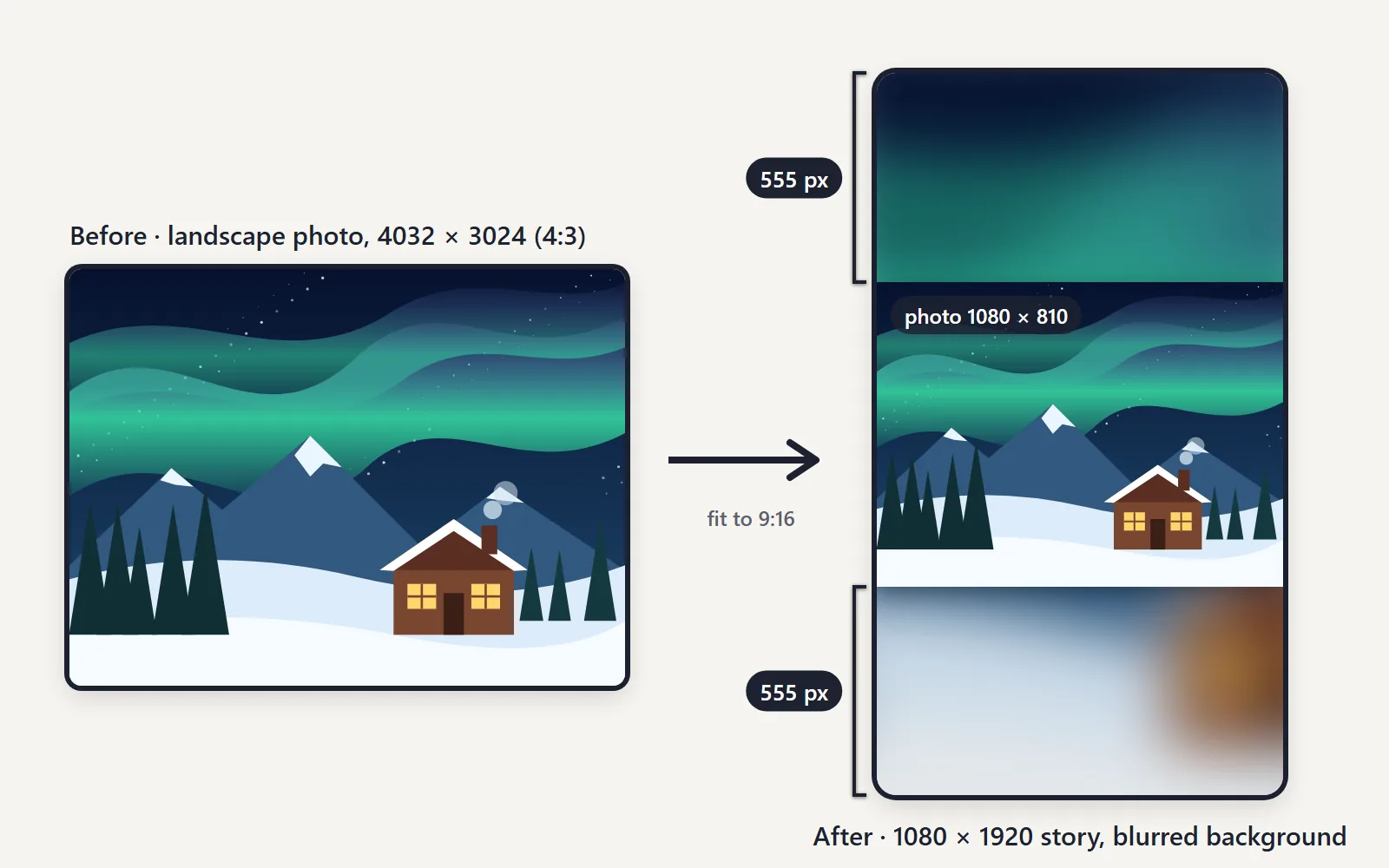
We placed one 4032 × 3024 landscape photo on a 1080 × 1920 story with a blurred background. All numbers below are worked out from the sizes, not measured on a phone.
Updated Nov 2026
9:16, a full vertical screen. Meta's developer docs recommend 9:16 to avoid cropping or blank space.
Meta's ads guide recommends 1440 × 2560 px for story ads. Most size guides list 1080 × 1920, which is also 9:16 but isn't on an official page.
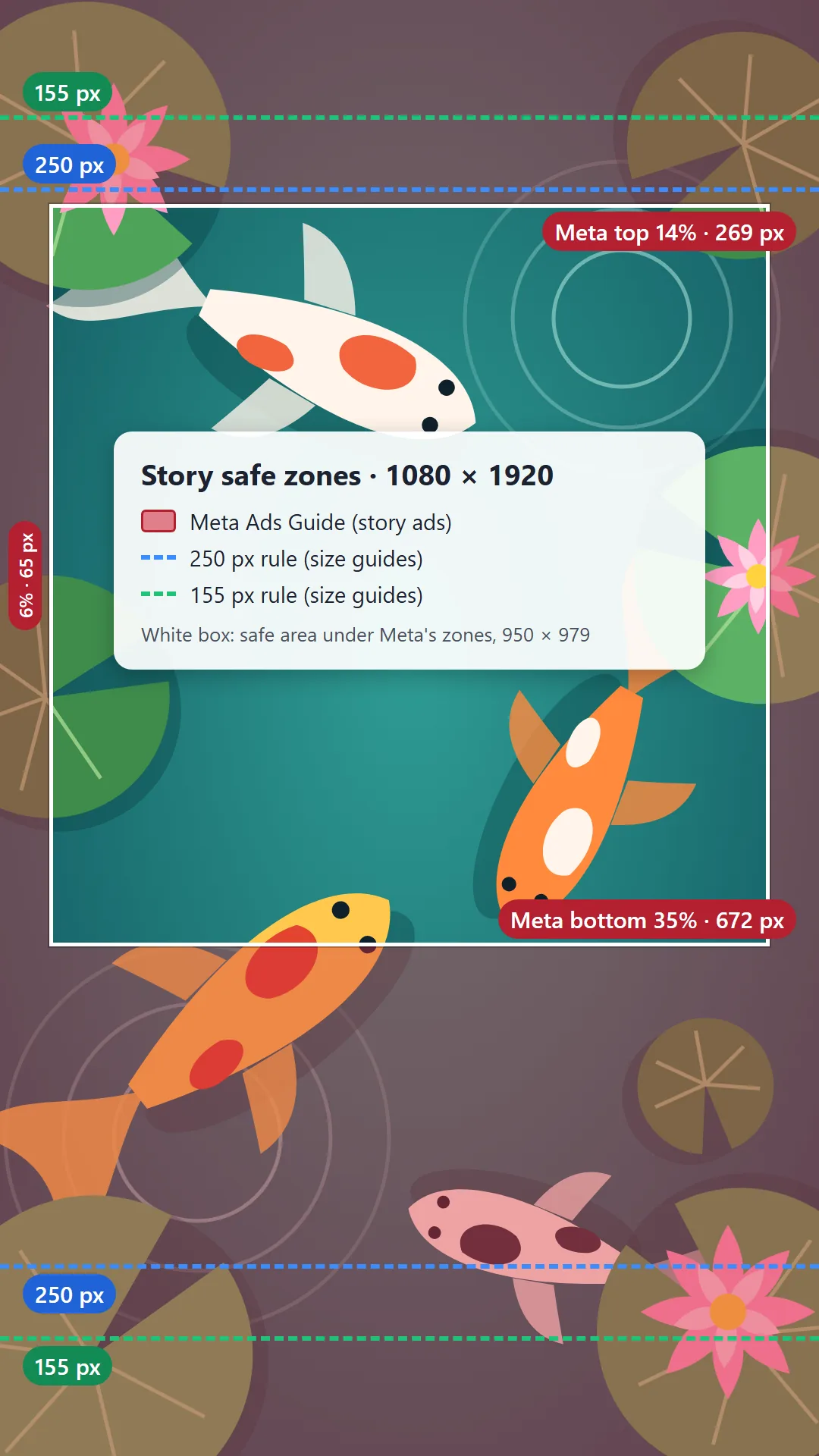
Meta's ads guide says keep 14% clear at the top, 35% at the bottom and 6% on each side. Other guides use 250 px or 155 px at the top and bottom.
Both fill the screen at 9:16. Reels can also be any shape from 1.91:1 to 9:16.
Yes. Add a blurred or plain background to fill 9:16, or let Instagram place it for you.
Size guides give three different safe zones, and only one of them comes from Meta. Here is each one, where it comes from, and what it was written for, with the official numbers first.
| Guide | Top | Bottom | Sides | Safe area on 1080 × 1920 | From | Written for |
|---|---|---|---|---|---|---|
| Meta Ads Guide | 14% (269 px) | 35% (672 px) | 6% (65 px) | 950 × 979 | Meta Ads Guide, checked Nov 26, 2026 | Story ads |
| 250 px rule | 250 px | 250 px | Not given | 1080 × 1420 | Buffer size guide, Mar 17, 2026 | Regular stories, no source given |
| 155 px rule | 155 px | 155 px | Not given | 1080 × 1610 | Overvisual story size page, Aug 2, 2026 | Regular stories, no source given |
The Meta guide is the strictest because ads add a call-to-action button at the bottom. For a regular story, the 250 px or 155 px guide leaves more room, but neither cites Instagram.
The tool lets you switch between all three on your own photo. If text stays inside the Meta zones, it clears the other two as well.
Yes. This story resizer runs in your browser, with no sign-up, no watermark and no ads, and no limit on how many batches you resize.
No. Your photos are resized in your browser and never sent to our server.
Each photo becomes one 1080 × 1920 file in the format you pick. The table lists every detail, so you know exactly what lands in your downloads.
| Item | Detail |
|---|---|
| File type | JPG at quality 92, or PNG |
| Size | 1080 × 1920 (9:16) |
| Photos per batch | Up to 10 |
| Largest photo you can add | 30 MB each |
| Formats you can add | JPG, PNG, WebP, HEIC |
| Safe zone lines | Shown on screen only, not saved in the file |
| Watermark | None |
| File name | beach-story.jpg for a photo named beach.jpg |
PNG keeps text and graphics sharpest but makes bigger files. JPG at quality 92 suits photos and keeps files small.
The resizer prepares still images for stories and nothing else. Here is what it leaves out, why, and what to do instead.
| Item | Why | What to do instead |
|---|---|---|
| Resize video | It reads photos only | Use a video editor that exports 9:16 |
| Add stickers, polls or music | Those are added inside Instagram | Add them after you upload |
| Post the story for you | It has no access to your account | Save the image, then post it in the app |
| Promise exact button positions | The app layout differs by phone and changes over time | Keep key text inside the Meta zones |
| Download someone else's story | This page only resizes your own photos | Not offered on this page |
The safe zones are guides drawn from published numbers. Your own phone shows the final layout, so check one test story first.
People usually fix story size in one of three ways. The table compares them on safe zones, backgrounds and the file you end up with.
| MuteView | Typical story size guides | Posting straight in Instagram | |
|---|---|---|---|
| Safe zones you can see on your photo | Yes, 3 guides to switch | Described in text | Not shown |
| Safe zone numbers with a source | Yes | Often missing, and numbers differ | Not shown |
| Blur or plain background | Yes, both | Article only, no tool | Built-in placement you can't save |
| Batch of photos | Up to 10 | No | One at a time |
| Saves a 9:16 file | Yes | No | No file is saved |
A guide tells you the numbers once. The resizer shows them on your own photo, where you can see if a face or a word gets covered.
Every row links to the page it comes from and shows the day we checked it. The 1080 × 1920 row is marked unverified because no official page we could read states it.
| What | Value | From | Checked |
|---|---|---|---|
| Story image ratio, recommended | 9:16 | Meta developer docs | Nov 26, 2026 |
| Story ads, resolution | 1440 × 2560 | Meta Ads Guide | Nov 26, 2026 |
| Story ads, safe zones | Top 14%, bottom 35%, 6% each side | Meta Ads Guide | Nov 26, 2026 |
| Story 1080 × 1920 | Widely used, not on an official page | Unverified | Nov 26, 2026 |
| Story ratio to qualify for promotion | 9:16, or between 4:5 and 1.91:1 | Help Center | Nov 26, 2026 |
| Reel ratio range | 1.91:1 to 9:16 | Help Center | Nov 26, 2026 |
| Reel minimums | 30 fps, 720 px | Help Center | Nov 26, 2026 |
| Reel cover, recommended | 420 × 654 px (1:1.55) | Help Center | Nov 26, 2026 |
Help Center pages change without notice, and the cover size listed there may be older than what the current app uses.
9:16. A taller or wider image gets cropped or shown with space around it.
Any 9:16 size works. Meta's ads guide recommends 1440 × 2560, and most guides list 1080 × 1920, which this tool saves.
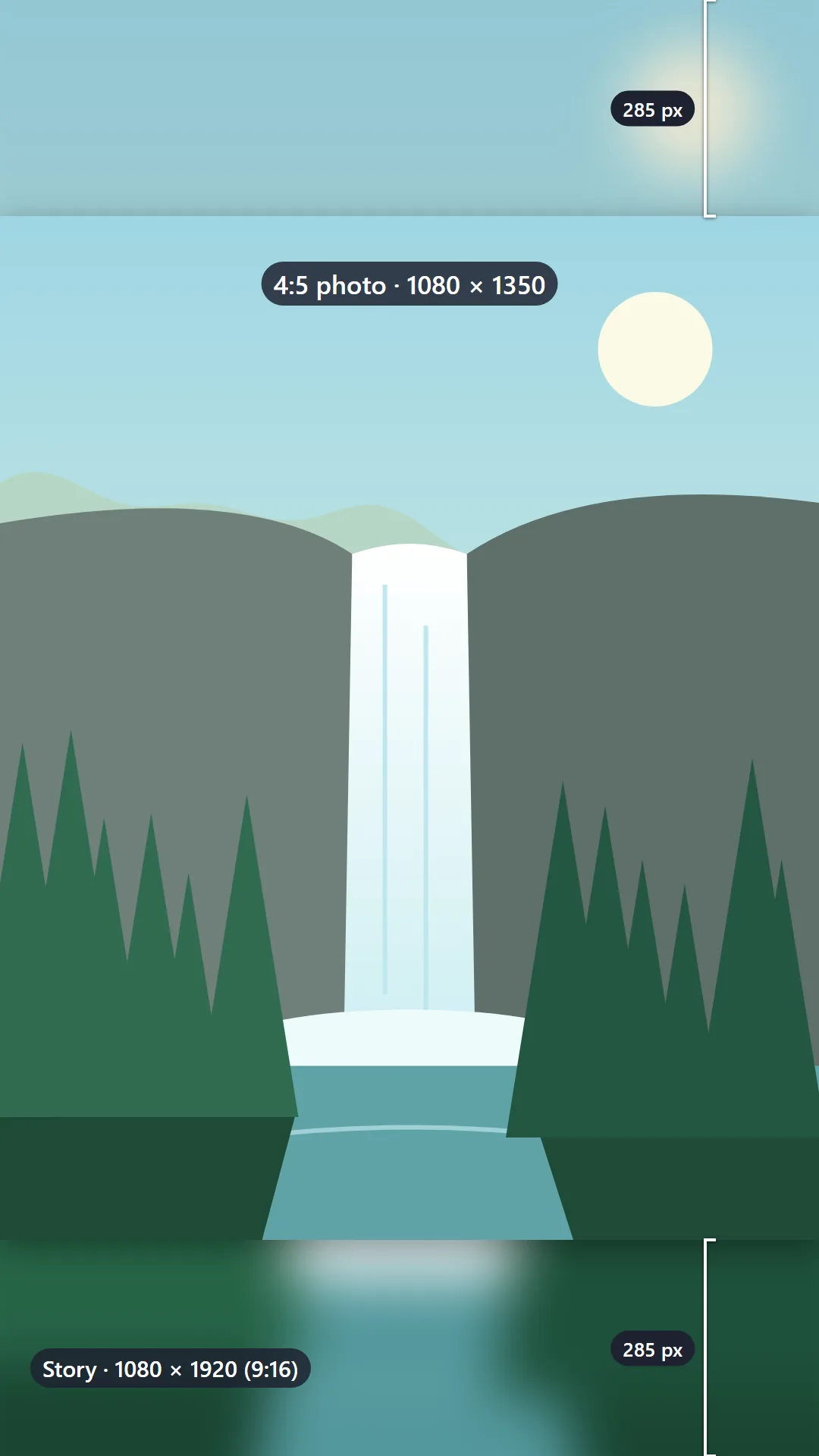
Yes. A 4:5 photo shows at full width with 285 px of space above and below on a 1080 × 1920 story. Fill that space with blur or a color here.
The usual causes are a photo under 1080 px wide, a screenshot of a screenshot, or Instagram's own processing on upload. Start from the original photo, save at 1080 × 1920, and turn on Upload at highest quality under Your app and media, then Media quality.
Both fill the screen at 9:16. A story is usually a single image or clip for 24 hours. A reel is a video that can be anything from 1.91:1 to 9:16.
Instagram's Help Center recommends 420 × 654 px (1:1.55) for cover photos.
It sits under the profile bar or the reply bar. Turn on the Meta safe zone guide and move the text inside it.
Choose a 1.91:1 card or full width, add a blurred background, and save. The whole photo stays visible.
feed sizes from 1.91:1 to 3:4.
borders for feed posts.
check slides and split a panorama.
split one photo across your profile.
save a public reel.
see how other accounts keep stories on their profile.
Pricing
2 lookups a day signed out; a free account gets 30 a month, up to 5 a day. Pro adds 200 lookups a month; lookup packs never expire.
$5.99/ month