Free
$0- 2 lookups a day signed out; signed in, 30 a month, up to 5 a day
- Single-post downloads are free
- ZIP up to 20 images
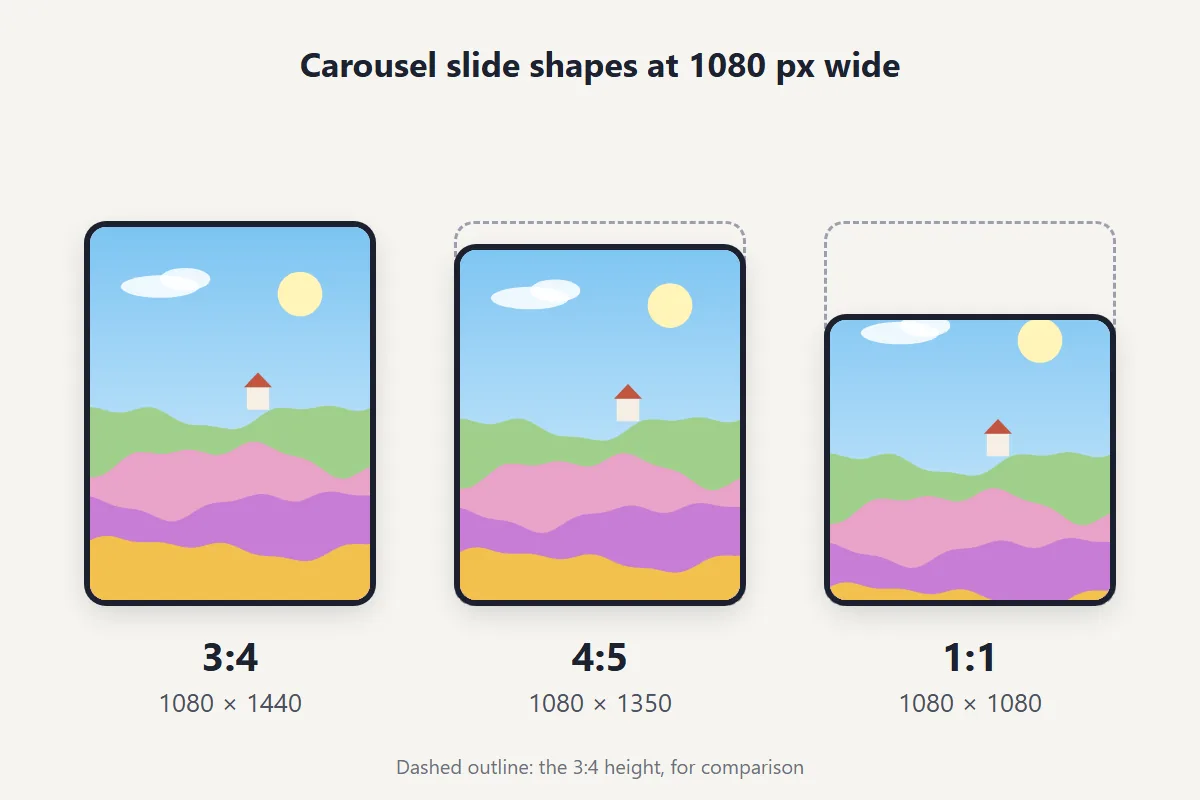
The Instagram carousel size is up to 20 slides in one shape: 1080 × 1440 (3:4), 1080 × 1350 (4:5) or 1080 × 1080 (1:1).
Add your slides as pictures and the checker flags the ones Instagram would cut. Then resize them all to one size, or split one wide photo into a seamless carousel.
Up to 20 photos or videos per carousel, per the Instagram creators blog. One orientation for every slide, per the Help Center. Checked Nov 26, 2026.
JPG, PNG, WebP or HEIC · up to 20 slides · up to 20 MB each
 Up to 20 slidesSeamless split
Size for all slides
Slides of another shape
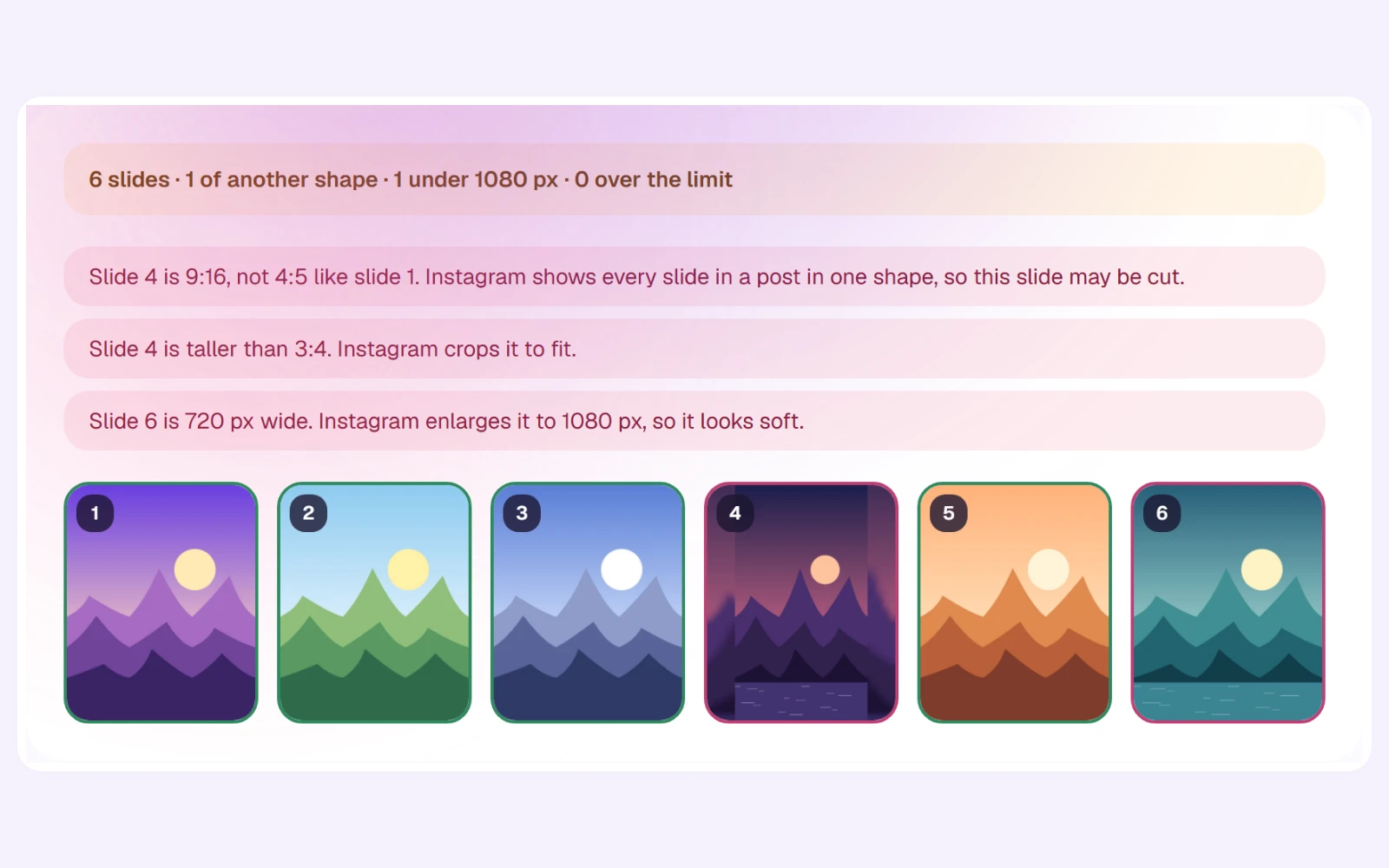
We worked through a sample carousel of six slides with three common mistakes in it. Each finding below is arithmetic from the slide sizes, not a posted result.
Updated Nov 2026
Up to 20 photos and videos. Instagram raised the limit from 10 in August 2024.
1080 × 1440 (3:4) is the tallest slide the Help Center allows. 1080 × 1350 (4:5) is the size most guides recommend.
No. The orientation you choose applies to every slide, so slides of another shape get cut to match.
No. A 3-slide and a 20-slide carousel use the same slide size.
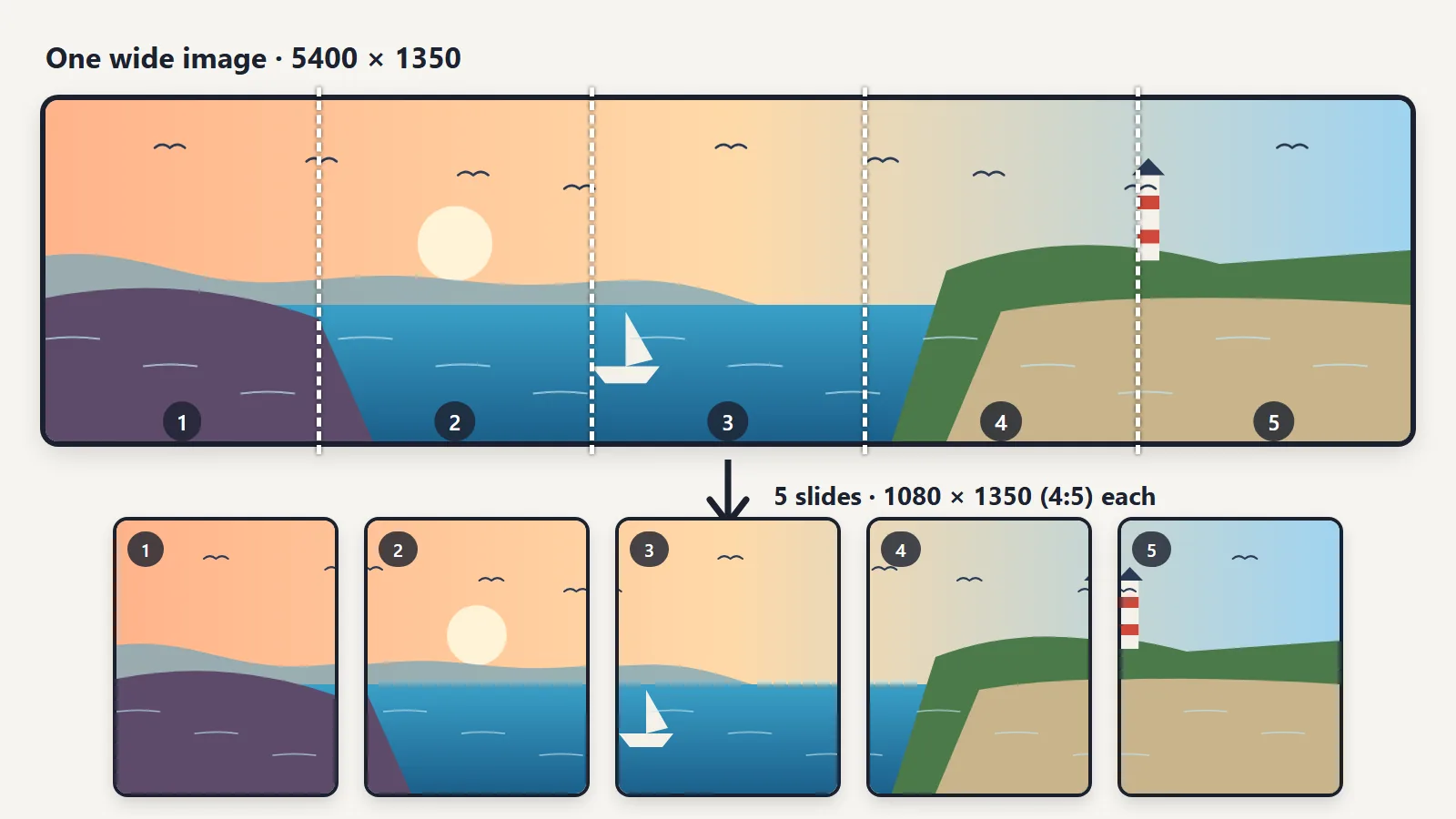
Slide width times slide count. For 5 slides at 1080 px, that's 5400 px.
Carousel guides agree on the 20-slide limit and disagree on almost everything else. Here is each claim, where it comes from and what it applies to, with Instagram's own pages first.
| Claim | Number | Where it's stated | Status |
|---|---|---|---|
| Slide limit | 20 photos and videos | Instagram creators blog, Aug 2024 | Official |
| One shape for all slides | "the orientation you choose affects all of the photos or videos in your post" | Help Center | Official |
| The first slide sets the shape | Not a number | Buffer, Overvisual and AI Carousels guides | Unverified, not in Instagram's text |
| Best ratio | 4:5, 1080 × 1350 | Overvisual (Aug 2026) and Carousel Maker (Sep 2026) guides | Opinion |
| Best ratio | 3:4, 1080 × 1440 | AI Carousels guide | Opinion |
| Safe margin from the edges | 50 px | Overvisual guide | Opinion |
| Safe margin from the edges | 60 to 80 px | Carousel Maker guide | Opinion |
| Safe margin from the edges | About 65 px | AI Carousels guide | Opinion |
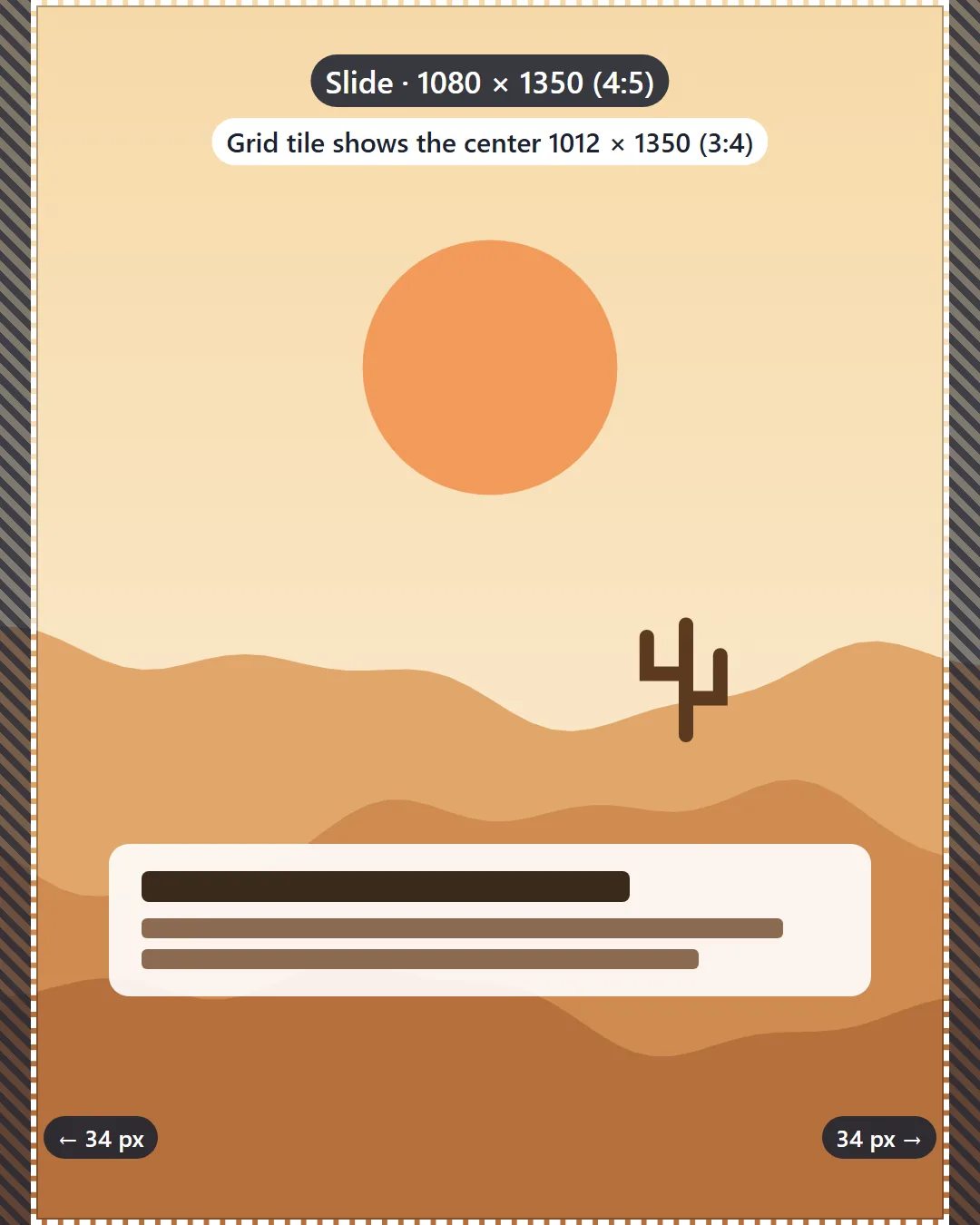
| What a 4:5 slide shows in a 3:4 grid | Center 1012 × 1350 | Several guides | Calculated: 1350 × 3 ÷ 4 |
| Video length per slide | Up to 60 seconds | Overvisual guide | Unverified |
All three margin numbers clear the slide counter and the dots. If you keep text 80 px from every edge, you satisfy all three.
The slide size never changes with the slide count. Only a seamless carousel, cut from one wide image, needs a wider source photo as you add slides.
| Slides | Each slide (4:5) | Each slide (3:4) | Seamless source at 4:5 | Seamless source at 3:4 |
|---|---|---|---|---|
| 2 | 1080 × 1350 | 1080 × 1440 | 2160 × 1350 | 2160 × 1440 |
| 3 | 1080 × 1350 | 1080 × 1440 | 3240 × 1350 | 3240 × 1440 |
| 5 | 1080 × 1350 | 1080 × 1440 | 5400 × 1350 | 5400 × 1440 |
| 7 | 1080 × 1350 | 1080 × 1440 | 7560 × 1350 | 7560 × 1440 |
| 10 | 1080 × 1350 | 1080 × 1440 | 10800 × 1350 | 10800 × 1440 |
| 20 | 1080 × 1350 | 1080 × 1440 | 21600 × 1350 | 21600 × 1440 |
The seamless width is 1080 times the number of slides, and the height is 1350 or 1440. For square slides, use 1080 as the height.
Most blurry carousels come down to four causes, and each one has a simple fix you can make before you post.
Yes. The checker and splitter run in your browser, with no sign-up, no watermark and no ads. Check as many carousels as you like.
No. Your pictures are read and resized in your browser. They aren't sent to our server.
You can save the whole carousel at once or one slide at a time. The table lists every file the tool makes and how it is named.
| Item | Detail |
|---|---|
| File type | One ZIP with JPG slides, or single JPG slides |
| Slide size | 1080 × 1440, 1080 × 1350 or 1080 × 1080 |
| Number of slides | Up to 20 |
| What you can add | JPG, PNG, WebP or HEIC pictures |
| File names | beach-01.jpg, beach-02.jpg and so on for a photo named beach.jpg, in swipe order |
| Overlay | A transparent PNG of the safe margins and grid crop, for your design app |
| Watermark | None |
The overlay is a guide layer, not a slide. Put it on top of your design in any editor, then hide it before you export.
The tool prepares still slides, and the posting happens in the app. Here is what it leaves out, why, and what to do instead.
| Item | Why | What to do instead |
|---|---|---|
| Upload the carousel for you | It has no access to your account | Select the slides in order in the Instagram app |
| Resize video slides | It handles pictures only | Export video at the same shape in your video app |
| Keep mixed shapes in one post | Instagram applies one orientation to all slides | Resize every slide to one shape here |
| Go past 20 slides | Instagram's limit is 20 | Split into two posts |
| Write or design the slides | It checks and resizes what you bring | Design in your usual editor, then check here |
Bring finished slides. The tool then makes sure Instagram shows them the way you designed them.
There are three common ways to get a carousel the right size. The table compares them on checks, shapes and the files you get.
| MuteView | Typical carousel guides | Posting straight in Instagram | |
|---|---|---|---|
| Flags slides that will be cut | Yes, before you post | No, they give a size table | After you select them |
| Slide shapes | 3:4, 4:5 or 1:1 | Usually 4:5 and 1:1 | One orientation for the post |
| Seamless split | Yes, with a swipe preview | No | No |
| Profile grid preview with crop frame | Yes | No | Only after you post |
A size table tells you the target. The checker tells you which of your own slides miss it, and fixes them in one step.
Every row links to the page it comes from and shows the day we checked it. The last row is marked unverified because Instagram's text doesn't say it.
| What | Value | From | Checked |
|---|---|---|---|
| Carousel limit | Up to 20 photos and videos | Instagram creators blog, Aug 2024 | Nov 26, 2026 |
| Carousel limit (API) | Up to 20 items | Meta developer docs | Nov 26, 2026 |
| One orientation per post | Applies to every photo and video | Help Center | Nov 26, 2026 |
| Photo ratio range | 1.91:1 to 3:4 | Help Center | Nov 26, 2026 |
| A 9:16 slide | Taller than 3:4, so it is cropped | Help Center | Nov 26, 2026 |
| Crop to match the first slide | Not stated by Instagram | Unverified | Nov 26, 2026 |
A 1080 × 1920 story graphic used as a slide keeps at most 1080 × 1440 of its height. That is a loss of 480 px, so redesign tall graphics for 3:4.
To split a panorama instead, switch to Seamless split and pick the shape and slide count. Then move the photo so no face sits on a seam.
1080 px wide, at 3:4 (1440 tall), 4:5 (1350 tall) or 1:1 (1080 tall). Use one size for every slide.
Multiply 1080 by the number of slides for the width. 3 slides at 4:5 need 3240 × 1350.
20. Instagram's creators blog announced the change in August 2024.
One orientation applies to the whole post. Slides with another shape get cut to match it. Resize them all to one shape first.
3:4 is inside the photo range on the Help Center.
The slides were cut at different widths, or picked in the wrong order. Use slides of equal width and post them in file name order.
check one photo at four ratios.
split a photo across your profile grid.
fit single photos to one ratio.
turn a slide into a 9:16 story with safe zones.
Pricing
2 lookups a day signed out; a free account gets 30 a month, up to 5 a day. Pro adds 200 lookups a month; lookup packs never expire.
$5.99/ month